
Need to install apps on your Firestick devices, but it’s not available on the Amazon App Store? This guide will show you how to jailbreak Firestick so you can access unlimited content! This tutorial is suitable for the 2nd Generation Firestick, Fire TV Cube, and Firestick 4K!
I’ll also highlight a tutorial on how to download and install the best VPN on your Firestick for safe and secure streaming.
Before moving ahead with the tutorial, you’ll first have to understand what Jailbreaking is.
What is a Firestick Jailbreak?
In simple terms, Jailbreaking is when you download third-party apps on your Firestick that usually aren’t available on the Amazon Store on your Fire device.
It’s to unlock your Firestick to access unlimited content from the internet that Amazon puts restrictions on. You’ll have to download the APK files through a method called “Sideloading.” It allows you to hack Firestick, to download apps from unknown sources, not causing any harm to your device.
In this way, you’ll have access to unlimited content. Think of it as a Firestick hack, without you causing any damage to the device.
However, there are times when certain apps are geo-restricted to certain countries, and to access them, you’ll have to connect to the best VPN software. We’ll get to that part later, but first let’s go through a tutorial on how to jailbreak the Amazon Firestick or Fire TV.
How to jailbreak Firestick/Fire TV (Downloader app method)
The Amazon Firestick paves the road to unlimited streaming especially when you install jailbroken APK apps. Secondly, to jailbreak apps on your Firestick, you’re going to need to download a streaming app (Downloader app) that allows sideloading other apps on your Fire TV.
It doesn’t take much time to get started and this tutorial, as mentioned above, works with Firestick 4K and Fire Cube.
Keep in mind that because you’re downloading third-party content you need to make sure you’re connected to a VPN. Jailbreaking your Firestick isn’t causing any harm to your device, and all that you need for it is a remote, your Firestick and a secure internet connection.
However, before we get started with jailbreaking your Firestick, you’ll have to enable apps from unknown sources on your device. This will then allow you to sideload third-party apps, following my easy guide. Here’s what you should do:
How to enable apps from unknown sources
- Go to the Settings menu on your Firestick, and click on “Device or My Fire TV”
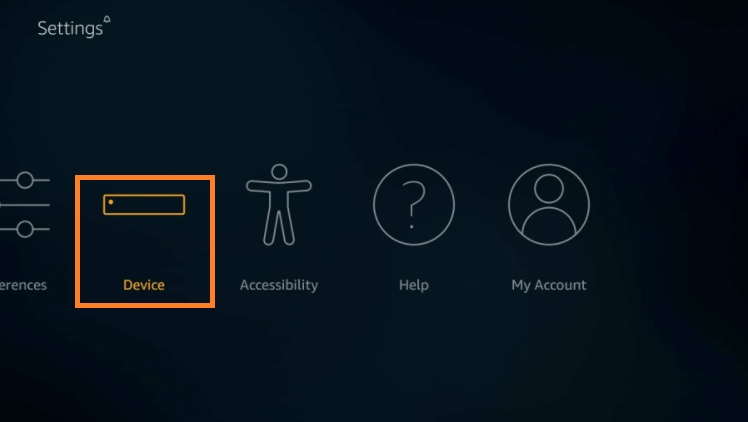
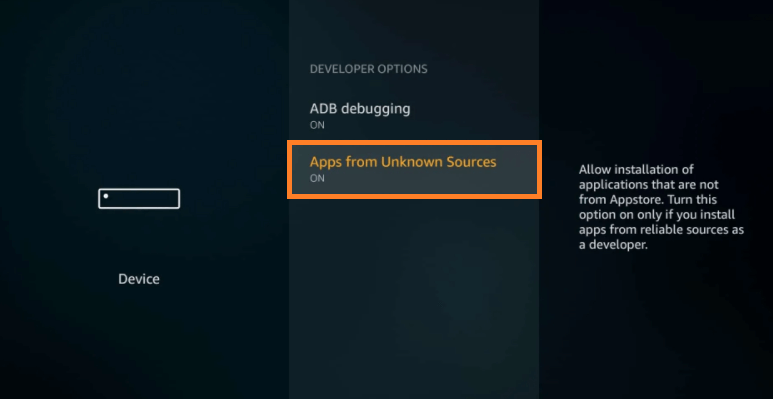
- Now, go into “Developer Options” and enable the “Apps from Unknown Sources.”
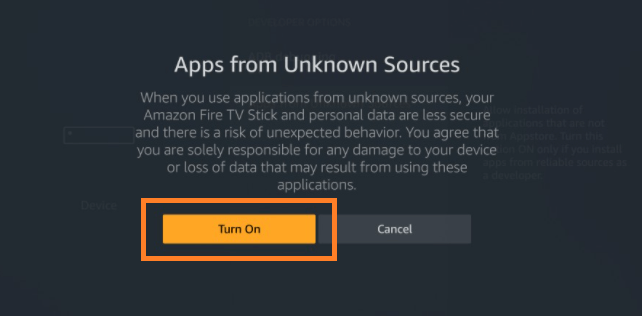
- If you’re prompted by a warning sign, just click on “Turn On.”
Installing the Downloader app on your Firestick
Now, to download APK or third-party files, you’ll have to install the Downloader app. It won’t take much time since it’s already available on the Amazon App Store. All you have to do is:
- Go back to the search bar, and type in “Downloader”
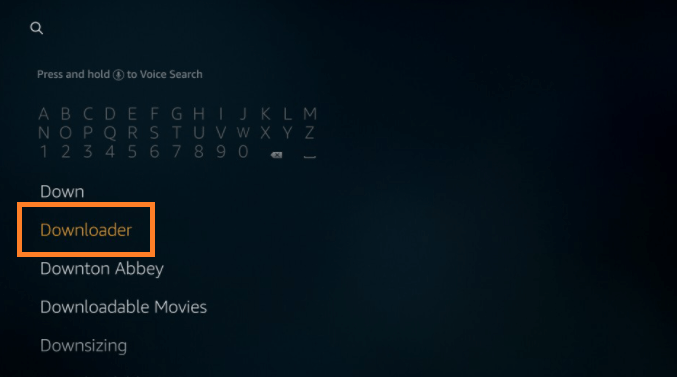
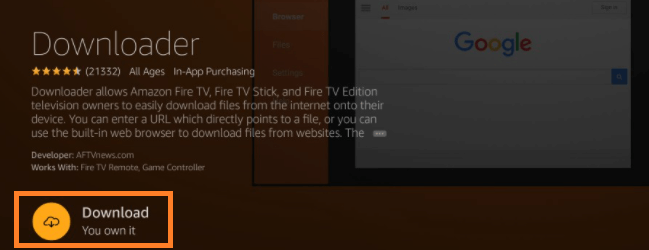
- Once you find the app, download and install it on your device.
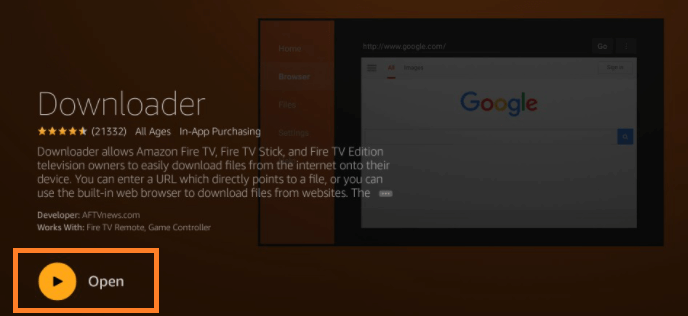
- When it’s installed, click on “Open.”
Jailbreaking Firestick (Downloader method)
Now, I’ll show you how to Jailbreak Firestick to download Kodi using the Downloader app. But before that, make sure you’re already connected to the VPN. Here’s what you should do:
- Run the downloader app, and enter in the URL of the app you’re trying to download (near the default http://). In this case, we’ll take Kodi as an example.
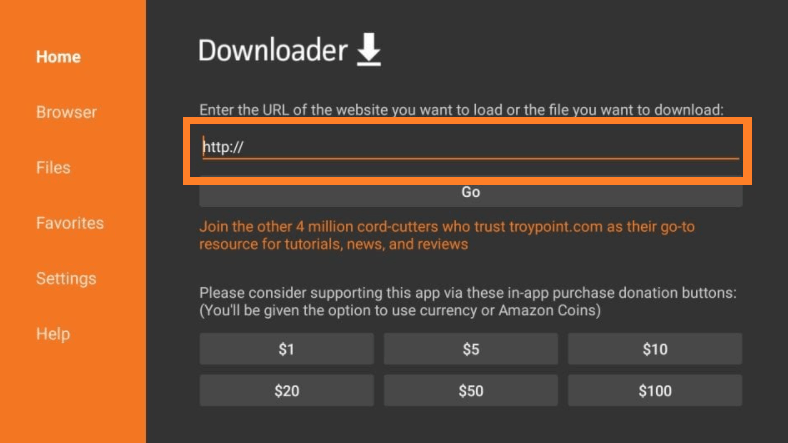
- Enter in tv/download into the URL tab and then click on “Go.”
- To download the Kodi APK, you’ll see 3 options. Download the one that says ARMv7A 32-bit APK.
- The Downloader app will now download the Kodi APK.
- Once it downloads, you’ll be asked to approve permissions. Then click on “Install.”
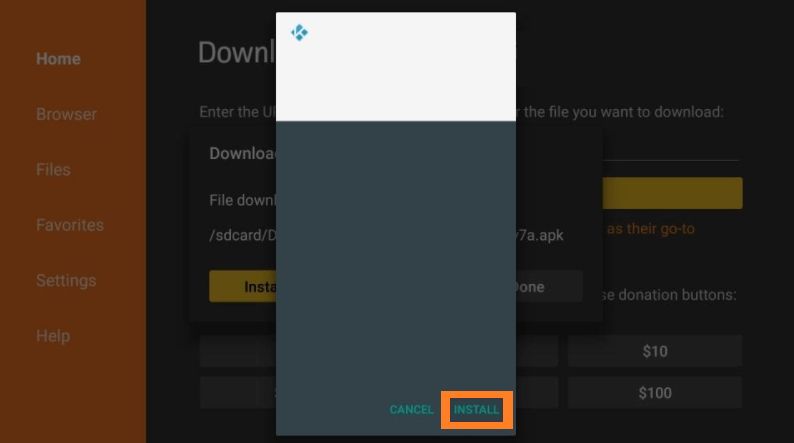
- When it installs, you’ll receive a notification that says “App installed” and then you can open it.
That’s about it! Similarly, you’ll be able to download other third-party apps on your Firestick/Fire TV, using the same tutorial above. The directions are easy to follow, and once you have everything open in front of you, the onscreen instructions you’ll receive will guide you along the way.
How to Jailbreak Firestick using the ES File Explorer method
The “Downloader” method is the most preferred choice to sideload third-party content. However, there might be circumstances where the Downloader app won’t be available depending on where you’re located.
In these circumstances, there’s another way to download third-party apps on your Firestick that’s only if the Downloader method isn’t working for you. It’s called the ES File Explorer method.
Here’s how you jailbreak Firestick with the ES File Explorer method:
- Go to the settings and click on “My Fire TV”
- Now, open the “Developer Options”
- Enable the “Apps from Unknown Sources”
- Head back to your settings on the main page on your Firestick. Click on “Preferences” and then on “Privacy Settings”
- Disable the “Device Usage Data” option and then disable “Collect App Usage Data”
- Now, head back to the home screen on your Fire TV.
- In the search tool, type in “ES File Explorer”
- Once you find the right app, click on “Download” and wait for it to download and install.
- Run the ES File Explorer app by clicking on “Open”
- Now, on the right side of the ES File Explorer, click on the “Download”
- And then on “+New”
- Enter “tv/download” in the URL section and then click on “Download Now”
- Once downloaded, click on “Open file” and then click on “Install” when prompted.
- Scroll down to the bottom and click on “Install” again.
- Once you’ve downloaded the app, you should see a notification that says “App installed.”
That’s about it! You’ve now successfully jailbroken Firestick using the ES File Explorer method.
Why do you need a VPN for jailbroken Firestick?
Now that you’ve jailbroken your Firestick, you can download any apps you like. However, not all apps are secure and there are other factors like ISP surveillance to keep an eye out for.
Keeping all that in mind, using a Firestick VPN will protect you online, keeping all your streaming activities, device and data private and secure. A VPN is always recommended when jailbreaking your Firestick. It’ll also allow you to download certain apps that aren’t accessible where you’re located. For instance, Kodi might be available in some countries, but not in all. By connecting to a US server on your VPN, you’ll be able to access it.
However, you can’t choose just any VPN to use on a jailbroken Firestick. Only a few VPN services are advisable to use on your Firestick or Fire TV device, and they are:
What is the best VPN to use for Jailbroken Firestick?
Even though these 5 VPN services work the best for Firestick devices, my top recommendation would be Surfshark, since it performs the best overall. It produces fast speeds, is easy to install on Firestick, and allows unlimited simultaneous connections.
Surfshark is also one of the best VPN services for Kodi, which means you can connect to it to safely install Kodi add-ons on your jailbroken Firestick.
It even comes with a 30-day money-back guarantee, which means you can utilize that to test your Jailbroken Firestick.
How to download a VPN for your Firestick?
So, before getting started with sideloading apps on your Fire device, make sure you’re connected to the VPN. Here’s what you should do:
- Subscribe to a Firestick VPN. I recommend Surfshark.
- On your Firestick device, head to the search icon and type in “Surfshark”
- Once you find the correct VPN app, download and install it on your Firestick / Fire TV.
- Launch the app, and sign in to your account.
- Choose the best server according to where you’re located or one that’ll unblock a particular app.
- Hit connect.
- That’s it!
Now that you’re connected to the VPN keeping your device and anonymity secure, you can proceed with using your jailbroken Firestick (Fire TV Cube / Firestick 4K.)
FAQs
Why do you jailbreak a Firestick?
Firstly, there are apps that aren’t available on the Amazon Store, so to access them, you’ll need to jailbreak your Firestick. Secondly, there are streaming apps that cost a little too much. So, to avoid overspending, you can jailbreak your Firestick to access apps that offer the same movies, TV shows etc. for free! Jailbreaking your Firestick increases the possibilities of your Fire device, unlocking unlimited possibilities. However, because most of the content is in violation of copyrights, using a VPN is advisable.
What are the most on-demand apps for Jailbroken Firestick?
There are only a couple of reliable or safe jailbroken Firestick apps available that include:
- Kodi (Free)
- Cinema APK (Free)
- CyberFlix TV (Free)
- CatMouse (Free)
- Titanium TV (Free)
- Stremio (Free + Paid)
- TeaTV
- Typhoon TV (Free)
Is Jailbreak Firestick safe and legal?
Generally, yes. Jailbreaking Firestick by sideloading apps is considered as safe and legal. When you sideload an app on your Firestick, you’re technically not making any changes to your system of your device.
Because you’re not making any changes or tweaks to your Firestick, you wouldn’t really call it Jailbreaking, unlike the procedure we use, to jailbreak an Android and iOS smartphone (both of which aren’t safe).
However, there’s a downside to jailbreaking Firestick. For instance, there are some users who aren’t willing to pay a fee for a Netflix subscription. So, they can get the same Netflix content for free by jailbreaking their Fire device.
Seems legit? Not really.
The fact is, because you’re downloading copyrighted content that is considered as illegal. This is why using a VPN to jailbreak Firestick is considered the best and safest option. It’ll hide your activities, anonymize you, and encrypt your data.
Is Kodi the best third-party app for Firestick?
Yes, technically speaking, Kodi is the best and most popular third-party app for Firestick. You can easily sideload on your Fire device using the Downloader app.
There are countless of apps and streaming content that aren’t available on Firestick nor on the Amazon Store. This is why we jailbreak Firestick to access apps that you might not readily find. In this case, instead of sideloading multiple third-party apps, most Firestick users prefer using Kodi – an open-source streaming service.
It’s a one-stop solution for multiple streaming content, add-ons, Kodi-builds, etc. However, since Kodi is a free and open-source platform that involves third-party content, I recommend using a Kodi VPN to help protect you online, and to access the service in countries where it’s not available.
What channels or content can I access on Jailbroken Firestick?
You’ll have access to unlimited third-party apps and channels from a variety of sources. Additionally, you’ll even get to access content from the Amazon Store even after you’ve jailbroken your Fire device.
What is Amazon Firestick?
Amazon Firestick is powered by Android OS and is the most popular and sought after streaming device. Plug it into an HDMI port of any Smart TV and transform it into the ultimate streaming device where you can access a whole world of content. What’s more is, you’ll be able to jailbreak your Firestick to access apps that aren’t available on the Amazon Store, without damaging or interfering with the system of your device.
Can I use the same method to jailbreak Firestick 4K?
All the tutorials on this guide allow you to jailbreak every kind of Firestick device you own, apart from first-generation Firestick. You can use the same method on your second generation Firestick, Fire TV Cube, and Firestick 4K.
Is there a way to jailbreak a Firestick without having an Amazon account?
In general, you can’t set up a Firestick without having an Amazon account. So, make sure you sign up with the service, set up your Firestick, and then you’ll be able to jailbreak your Fire device.
In conclusion
Coming to the end of this tutorial, you now know how to jailbreak Firestick / Fire TV and also know how to download jailbroken apps on your Fire TV device using two methods. If you follow the instructions carefully you’ll have access to unlimited content in no time.
Also! Always make sure you’re connected to a top vpn before accessing any third-party content, or downloading copyrighted material, be it on your Firestick or any other streaming device. It’ll secure your connection and allow you to safely access unlimited content from anywhere around the world.





